Apple Wallet and Google Wallet tickets for events
Guide for event organizersWallet tickets make the buying and entrance experience simpler for visitors. After purchase, they can save the ticket on their smartphone, open it quickly at the door and avoid printing a PDF. For organizers, this means fewer support questions, fewer forgotten tickets and a more modern check-in flow.
TicketTool can provide Apple Wallet and Google Wallet tickets alongside regular PDF tickets. Visitors receive the links in their confirmation email and save the ticket in just a few taps. This guide explains how wallet tickets work, when to use them and how to activate them in TicketTool.
Want to offer modern digital tickets?
We can show you how TicketTool combines PDF tickets, wallet tickets and entrance control in one workflow.
Book a 30-minute demoWhat are the benefits of wallet tickets?
The main advantage of wallet tickets is ease of use. Visitors click the link in their confirmation email, save the ticket and have it ready for entrance control. They do not need to print anything, and they are less likely to forget the ticket at home. Wallet tickets are also more environmentally friendly than printed tickets because they avoid paper and printer ink.
When should wallet tickets not be used?
The only contraindication is that your ticket scanner cannot read the barcodes from the smartphone screen. To check it, you should download a test ticket to your smartphone and try to read the barcodes out with the scanner you use while checking tickets to your events. In case the ticket cannot be scanned, you can use our smartphone app which reads barcodes from smartphone screens without any problems.
How to activate wallet tickets in TicketTool
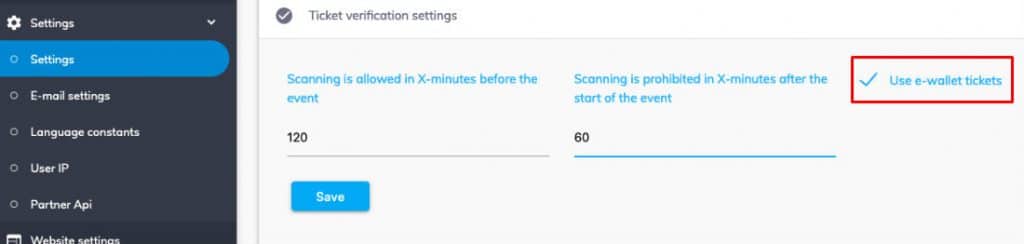
To activate this feature, open the scanning settings in TicketTool and enable wallet tickets. The feature is disabled by default, so each organizer can decide whether to offer wallet tickets for an event.
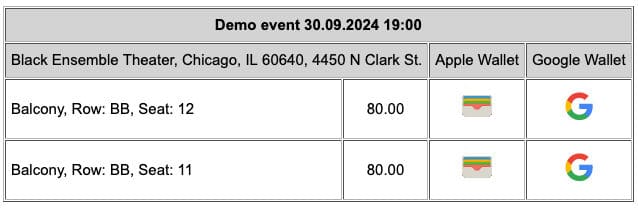
The ticket confirmation email then includes separate links for Apple Wallet and Google Wallet.
What do wallet tickets look like?
These tickets are an electronic document that contains all the information required for verification, in addition to the barcode. To be exact: the name of the event, the start date, the name of the buyer, the price of the ticket, the zone, row, and seat that the buyer paid for.
Example of an Apple Wallet ticket:

Example of a Google Wallet ticket:
Do visitors need to install additional apps?
In most cases, no additional app installation is needed. Apple Wallet is installed on iPhones by default. On Android, Google Wallet is not always preinstalled. Depending on the device and Google services available, visitors can still open and save the ticket.