Use your own domain for your ticket shop
Guide for event organizersWhen visitors buy tickets, the checkout experience should build trust. A different platform, unfamiliar branding or a strange URL can create friction exactly when the buyer is ready to pay. With TicketTool, organizers can run their ticket shop under their own brand and domain.
This is valuable for theatres, clubs, circuses, festivals, museums, restaurants and event organizers who want to build a direct relationship with their buyers. Ticket sales feel like a natural part of your website instead of a detour to a third-party platform.
Want a ticket shop under your own domain?
We can show you how TicketTool connects your website, subdomain and branded ticket shop.
Book a white-label ticket shop demoWhy your own domain helps ticket sales
Your own domain strengthens the organizer's brand. Visitors stay in an environment they already recognize: same website, same language and the same visual trust. This can matter a lot for higher ticket prices or for organizers who are still building recognition.
It also keeps the customer relationship closer to you. Buyers remember your event brand, not a generic ticketing platform. That helps with repeat sales, newsletters and long-term marketing.
Domain or subdomain?
In most cases, a subdomain is the cleanest solution. Instead of moving the whole website, you can use a dedicated address such as tickets.your-domain.com or shop.your-domain.com for the ticket shop. Your main website stays unchanged.
A full domain can make sense when the project exists mainly for ticket sales or when the ticket shop is run as its own brand. For existing organizer websites, a subdomain is usually simpler, clearer and faster to launch.
How the technical setup works
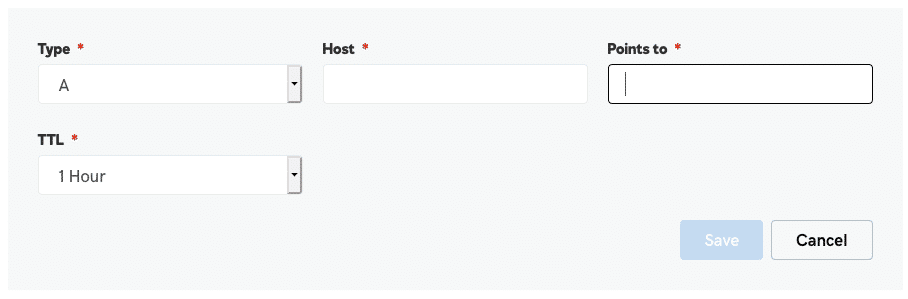
Technically, a DNS record is created for the chosen subdomain. Depending on the current setup, this may be an A record or a CNAME record. TicketTool provides the correct value for your installation.
Do not copy old IP addresses from historical instructions. DNS targets can change. Always use the current value provided during your TicketTool setup.
What TicketTool configures after DNS is ready
Once the subdomain points correctly, the ticket shop can be configured with your brand: logo, colors, copy, languages, ticket templates, emails and, depending on setup, payments and legal information.
SSL and secure delivery are part of the launch process as well. For visitors, the ticket shop should feel like a professional part of your own website.
When this setup makes the most sense
An own ticket shop domain is especially useful when you sell events regularly, send campaigns directly to your shop or want to avoid sending buyers to a third-party brand during checkout.
For a very small one-off event, a simple external link may be enough. For organizers with recurring events, a white-label ticket shop under their own domain is usually the better foundation.
Launch checklist
- Choose a subdomain, for example tickets.your-domain.com.
- Make sure you have access to your domain DNS settings.
- Use the current DNS value provided by TicketTool.
- Prepare logo, colors, legal copy and email sender details.
- Run a test purchase before linking the shop publicly from your website.
The result is a ticket shop that works reliably and feels like your own sales channel to visitors.